£2.50
Download Butterfly
Become a Member for free access to all the models in the showcase.
See the Membership page for more details.

Already a Member? Log in Here

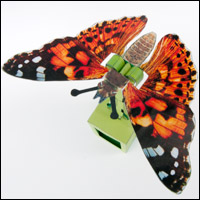
The Fluttering Butterfly is a pendulum powered model to download, print out and make. Any slight movement of the model make the wings tremble and flap. Members can download the model at the link for free. Non-members can download the parts for a small fee.
There are three pages of parts. Print out page one and two onto thin card. (230 gram/230 micron) notice that page two has a front and a back. Print out one side, flip the card over and print the other. Page three is the same but should be printed onto thin photocopier paper (80 gram)
Score the dotted lines then carefully cut out the parts.


The finished model.


Fold the bottom of the pendulum up and glue it into place.


Fold the pendulum in half and glue it at ninety degrees.


Glue the paper hinge into place on the grey area.

Glue the two linkages to the pendulum. Notice that the linkages fit between the grey lines (arrowed)


You'll need four coins of approx. 25mm diameters. Wrap the coin holders round the two pairs of coins. Glue the coins to the end of the pendulum.


Fold the ends round and glue them down to make triangular sections.


Repeat the process with the front and back of the box.


Glue the front, back and sides to the box base as shown.


Fold the box up and glue it together.


Fold up the flaps from the base and glue it to the inside of the box.


Glue the paper hinge to the box. Make sure that the glue is completely dry before you let the hinge take the full weight of the coins.


Fold up the wing stand.

Glue on the paper hinges.

Glue the two triangular wing bases to the paper hinge.


Glue the wing stand to the box.

Glue the linkages to the wing bases.


Glue the smaller of the leaf stands into place.


Fit the leaf over the wing stand and glue it to the small leaf stand. Make sure that the leaf doesn't catch on any of the moving parts.


Glue the larger leaf stand to the side of the box in the position shown.


Glue the two lower wings into place. Make sure that the ends of the wings are touching each other.


Glue the top pair of wings into place.


Complete the model by gluing the antennae to the bottom surface of the wing bases.

Once complete, present the model to your true love. Awww!


Keep up to date: Receive the latest blog post by email

Rate this post:
Average: 4.7 (44 votes)


Comments

Wednesday 2nd Feb 2011 23:10

hugo leandro

Dear Rob,

I couldn't resist to praise you: congratulations for this artwork piece! Simply marvellous. 

Thursday 3rd Feb 2011 17:14

robives

robives's picture

Thanks Hugo, I hope you enjoy the YouTube video of the finished model!

Friday 4th Feb 2011 09:17

Manlok927

Just a reminder

Change the bottom of the pages from

© Rob Ives 2010 to

© Rob Ives 2011


Friday 4th Feb 2011 12:16

robives

robives's picture

@Manlok927 -- Done. Thanks for the reminder.

Saturday 5th Feb 2011 05:32

charat

Nice job, but can´t download TT_TT

Saturday 5th Feb 2011 07:39

charat

Can you made a tutorial of pendulum? please ^^

Saturday 5th Feb 2011 11:38

robives

robives's picture

@charat, You need to be a paid subscriber to download the model for free. If you only have the free subscription you can download it for a small fee. 

Re the tutorial, do you mean a page about how pendulums work and how they can be used?

Sunday 6th Feb 2011 05:18

drinkumbrella

How much do your 25mm coins weigh?  The closest US coin to 25mm is a quarter (24mm), but nickels (21mm) are only .6g lighter at 1/5 the value. 5g vs 5.7g. Seems better to match weight than size.

I'm trying to figure out a US equivalent that doesn't sink real money into the pendulum!

Sunday 6th Feb 2011 10:13

robives

robives's picture

@drinkumbrella: Good point, the 2p coins that I use for this model are roughly 7g each.

Sunday 6th Feb 2011 20:46

drinkumbrella

I love this model. It just makes me happy to have it out on the table. An unexpected bump on the table gets the butterfly flicking its wings. Lovely. Probably my favorite from the last year -- simple, elegant, and the motion is pleasantly unexpected -- very butterfly-esque. (Other top favorites from the last year have been the "hoot" owl, the pneumatic giraffe, and the crow.)

My wife, who normally just tolerates the vast piles of paper models I leave lying around the house, also piped up in support! (My hearts-and-butterfly-crazy 4-yo daughter had a fresh packet of hello kitty stickers, so she hasn't really noticed, but I think she'll come around when the stickers are all lost or out of stick.)

If there were non-fading ink, this would go great in the back window of the car.

(I wound up using 4 nickels for the pendulum, 20g all together; works nicely.)

Sunday 6th Feb 2011 20:55

robives

robives's picture

Thanks for that @drinkumbrella. It's always really nice to hear that people have successfully made a model. My true love also says that the butterfly is her favourite. 

Sunday 6th Feb 2011 22:07

drinkumbrella

Here's what I could dig up in a few minutes from the last year of workshop notes (I forgot to get the pendulum sheep in to the picture).

http://flic.kr/p/9gaUFg

(please pay no attention to the minor mistakes, please, like the octopus with inside-out-legs!)

Sunday 20th Feb 2011 00:46

hugo leandro

Dear Rob,


Today I built the butterfly. I can say it is among one of the best model I have ever built! Marvellous, really. However, I experimented some difficulties in assembling the model, specially the wings. May I suggest you to put a weak line (or a photo) in order to help to line up the wings. Also, an instructions (a photo, in fact) showing the small fold of the leaf. The rest...well, congratulations again!   

Sunday 20th Feb 2011 17:27

robives

robives's picture

Thanks for your feedback Hugo - I'll see if I can add you ideas to the download.

Tuesday 1st Mar 2011 05:30

najmanjay

Although I have not built every one of your models, this butterfly, with its simple, elegant and lifelike movement, is my favorite by far. thank you.

Saturday 30th Jul 2011 14:04

Smelter

Smelter's picture

Talk about technology overkill!

"'Butterfly in a Jar' Electronic fluttering fun. Tap the jar to watch..."
http://www.houseofmarbles.com/products/Butterfly_in_a_Jar-1165-0.html

Some people need to learn how to make card models!
 

Interesting stand though.

Monday 15th Aug 2011 15:44

DobbyKnits

DobbyKnits's picture

Whoops!  The link to "Full instructions for construction" contained in the .pdf file is www.robives.com/blog/buttery.  No big deal.  I found it by changing the document name to butterfly.  Just thought you might want to know that the link in the model doesn't work.

Monday 15th Aug 2011 19:41

robives

robives's picture

Thanks for letting me know Linda. I've added a link so you can get to this page by typing in /buttery as well :-)

Thursday 19th Jul 2012 15:13

gkloda

Rob: I recently completed butterfly project using 4 - US 25 cent coins which correspond to the size required in the instructions. All moving parts operate freely, as does the the lever. The wings move, but don't  respond to simple vibrations as shown in your video.

Could the weight of the coins be the culprit? I've seen posts by other hobbyists who substituted US 5 cent coins, which are just a bit lighter.

Lovely project nonetheless; my 1 y/o granddaughter loves it! Thanks for your time.

It is certainly worth experimenting with the weight of the coin. A heavy coin works berst for this model. Alos, make sure that your hinges are moving freely.- RI

Sunday 22nd Jul 2012 04:41

cool022883

i used US nickles in mine and it works with just slight movement so the coins could be the problem.but it could be lots of other things to. so i would just try changing the coins and see if that helps .

Monday 6th Aug 2012 12:23

michael42er

michael42er's picture

A pretty butterfly has set here in the Phlox

http://www.youtube.com/watch?v=qPQjJ6pMziE

Michael

Butterfly paper model

Friday 7th Dec 2012 01:29

gkloda

Dec 6, 2012


I did a few more butterflies, with US 5 cent coins, and the action was overall much better. To make cutting out the antennae easier and with fewer accidents, I added a light smear of white glue to the back of the ball end of each antenna before cutting them out, thereby stiffening the floppy end a bit.


Thursday 9th May 2013 15:32

crazyche

Hi!
I slightly modified the original design to make it more "natuRealistic".

Next time, maybe, I'll also modify the butterfly design with something "picture-like" (instead of vector-like). Something like this: http://www.konicaminolta.jp/about/csr/environment/env_contents/paperkraft/sasakiacharonda.html

Thanks for your project!
Elio.
Italy.
:-)

Thursday 9th May 2013 15:49

Smelter

Smelter's picture

Hi crazyche, nice models on the site you linked to.

I've added it to the Free Models pages on the forum.

Thanks for sharing.

Thursday 9th May 2013 16:06

crazyche

I forgot to share my pictures!