

2

Belt Drive Robot

Tuesday 20th Jul 2010 17:57 : PRINT


I've spent most of the day adding models to the www.flying-pig.co.uk web site. I'm in the process of converting said web site from static pages to database driven, which, unfortunately means I have to spend ages and ages moving data from static pages into a database. Once it is done its done though. And I'll be glad.

I've found time this afternoon, to put together a more complete belt driven robot. If you can imagine him with rivets and textured colouring I think you'll agree that he is coming along nicely.

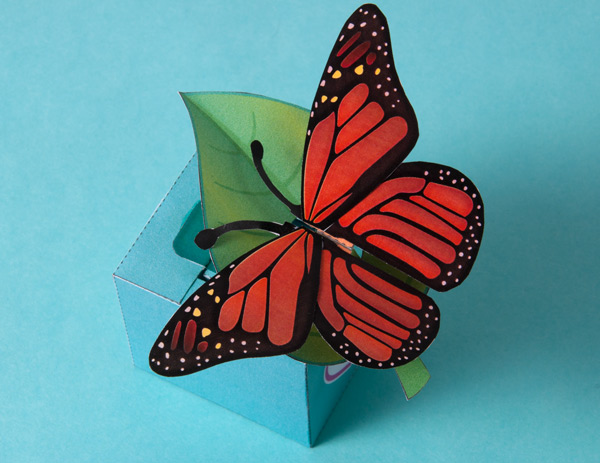
I reckon I might be able to use belt drive for a butterfly model I've been thinking about for a while...


Keep up to date: Receive the latest blog post by email
2 comments

0

Belt Driven Arms

Monday 19th Jul 2010 17:48 : PRINT


On todays agenda - work on the database for the flying pig website and, much more fun, further experiments on a theme of belt drives.

flapper

I've adapted the belt driven model from earlier on to use the mechanism from yesterday. The rotor that the arm is attached to is now connected to the body by a simple hinge rather than a fully rotating axle.


flapper

The movement is smooth and free and it gives the model a real mechanical steam punk look! I like it!


Keep up to date: Receive the latest blog post by email
Add new comment

0

More flapping about.

Sunday 18th Jul 2010 20:07 : PRINT


Further experimentation with the flapper design.

flapper

It occurred to me that the flapper design doesn't need to have an axle joint. The range of motion is only around 190 degrees so a hinge should do the job. To that end I have knocked up this quick prototype. It looks promising. I'll trying putting it into a more complete tomorrow.

Off to see Inception with #1 Son now...


Keep up to date: Receive the latest blog post by email
Add new comment

3

Mobius Snake - Download and Make

Saturday 17th Jul 2010 18:23 : PRINT


Here's a simple but fun project I think that you might enjoy making. The mobius snake is a single piece model that rolls round and glues to make a snake eating its own tail. The twist being the twist in the paper which give the mobius strip its mysterious properties. 

As a member you can can download the file at the end of the blog post. Print it out onto ordinary printer paper, cut it out and away you go!


Here is the finished model in all its simple glory. The mobius strip is a mathematical curiosity discovered in the 19th century - In its simplest form it is a strip of paper with a single twist glued into a loop. The weird thing is that, because of the twist the mobius strip has only one edge and one face. Trace your finger along one edge and without lifting it from the model you'll pass by both eyes before returning to your starting point!


Close up detail of the head.


Keep up to date: Receive the latest blog post by email

Purchase Mobius Snake

£2.00

Become a Member for free access to this and other files on the site.
See the Membership page for more details.

Already a Member? Log in Here

3 comments

3

In a flap

Wednesday 14th Jul 2010 18:43 : PRINT


image

These are the rotor parts for the flappy arm model. The core piece is approx 14mm in diameter. I'm still not sure about running square axles in round holes. But I'm not sure about creating circular shafts out of cardboard either. So for the moment I'll stick with the squares.


image

Here's how it all fits together. It works nicely and has a good range of movement. The mechanism is fun to make and interesting. I'm going to go straight for a completed model. I'll print out the photo above and sketch some ideas on top of it, lets see where we go!


Keep up to date: Receive the latest blog post by email
3 comments

0

Flapping arms!

Wednesday 14th Jul 2010 07:36 : PRINT


Here's a problem I keep butting up against. Say I have a model that needs flapping wings, or arms that go up and down. What I usually do is join a linkage from the body to the arm as in the above picture. The problem has always been the limited range of movement. As the arm reaches its upper and lower position the angle of the pushrod reduces to the point where it has no pressure. The end result is that the maximum range of movement is no more than about 100 degrees. 

There are a few different things that I can try. A rack and pinion should do the job as would a belt drive


So to that end. I've mocked up a prototype using a paper belt. The central upright is glued to the belt and another point glued to the a rotor with arm attached. 


So - head goes up and down, arm movement is over 190 degrees!

I'll be completing the mock up to make sure that it all works properly with two arms then I'll make a download of the mechanism available.


Keep up to date: Receive the latest blog post by email
Add new comment

2

Snap Up Squid - Come and get it.

Sunday 11th Jul 2010 20:44 : PRINT


Continuing my ongoing project to bring up to date releases of more obscure models that were previously hidden away on the flying pig site I bring you... The Snap Up Squid! Now there's a hole in your life that you didn't know needed filling!

This particularly delightful model is quick and easy to make. Download the file at the bottom of the post, print out onto thin card and assemble. The elastic band powered squid folds flat and can be slipped into a book or large greetings card only to pop out when the card is opened to the delight of the recipient.

There are two versions in the file. Colour and mono. Print out your choice onto thin card. Note that the colour version is double sided. Print one side, flip the card over and return it to the printer then print the other side.

Score all the dotted lines then cut out the pieces.


Glue the lower flaps of the two body halves together.


Join the top flaps together. Fold the squid flat before the glue dries to make sure that everything is lined up correctly.


Glue on the tentacles with the suckers on the inside.


Glue the eyes into place as shown.


Cut out the small square holes for the elastic band. Cut open a long thin elastic band. Thread it into place as per the picture, a pair of tweezers is useful for this job. Tie the ends of the elastic band with a double knot so that is is tight enough to close the squid body sharply but not so tight that it crushes it!


That's it! Your squid will fold flat to fit inside a book or card and snap up when it is opened.

Just what you always needed!


Keep up to date: Receive the latest blog post by email

Purchase Snap Up Squid

£2.00

Become a Member for free access to this and other files on the site.
See the Membership page for more details.

Already a Member? Log in Here

2 comments

0

Odd Bot. Come and get it!

Thursday 8th Jul 2010 19:46 : PRINT


assemble picture

The Odd Bot is a quick to build fun project that uses moire interference patterns to make the mouth appear to flicker. Lift the model up and down and the robo-lips quiver while the arms rise and fall!

Members can download the file of parts at the bottom of this post. Enjoy!

The model comes in two versions, coloured and line-only. For both models you will need two sheets of thin card. I use 230 micron board. You'll also need a single sheet of standard printer paper. The coloured version is printed on both sides. For each coloured sheet, print one side, flip the card over and return it to the printer to print the second side. Score the dotted lines and cut out the solid black lines. Carefully and accurately cut out the parts as you need them. 


assemble picture

Fold round the core to make a square tube. Curl the two long flaps. Carefully tuck one end of the long flap in and glue it into place using the grey lines for alignment...


assemble picture

...repeat with the second long flap to make this oval shaped core.


assemble picture

Wrap the paper belt round the core as shown and glue it down. The belt must be free to roll round the core so make sure that there is no glue on the back of it.


assemble picture

Glue on the two legs as shown above, lining up the top of the legs with the edge of the core.

Roll the belt round so that the edge is lined up with the lower edge of the core as shown.

Spread a thin line of glue across the belt in the position shown.


assemble picture

With the top of the belt lined up with the top of the box (arrowed) press the thin line of glue down to the belt so that the whole assembly it is in the middle of the back of the grey box face.


assemble picture

Fold round the body and glue it down. Glue the body lid into place. The legs must be free to move up and down so be careful with your glue!


assemble picture

Pull the legs until you can see the semicircular grey area through the arm holes.


assemble picture

Carefully glue each of the arms into place on the core making sure not to get glue on the body


assemble picture

Fold each of the horns fold along the curved score line to make a pleasing 3D effect. Thread each of the horns through the holes in the washer then glue them into place on the body using the picture below as an alignment guide. 


assemble picture

Curve the eye stalk round and glue the end to the back of the body. Complete the model by gluing on the 'tache and the feet.

Once the glue is dry move the body up and down for a pleasing optical effect! How odd is that!?

If you are member you can download the file of parts below. Just make sure you are logged in.


Keep up to date: Receive the latest blog post by email

Purchase OddBot

£2.00

Become a Member for free access to this and other files on the site.
See the Membership page for more details.

Already a Member? Log in Here

Add new comment

0

Download Link - Updated

Wednesday 7th Jul 2010 19:54 : PRINT


website

You may have noticed that this new link character has appeared next to downloads in the blog. There is a similar one for non-members exhalting them to sign up.

I'm really pleased with it, what do you think?


website

I must confess that I cheated. This is the existing model from the logo at the top of the web site with the board tacked into place. As long as we remain 2D on the computer screen I'll be able to get away with this sort of thing.

I'm finishing off a model based on the moire robot that I mentioned the other day. More news tomorrow.


Keep up to date: Receive the latest blog post by email
Add new comment

3

Agreeable Sheep - Come and get it!

Tuesday 6th Jul 2010 21:06 : PRINT


The Agreeable Sheep has moved from the Flying Pig web site to her new home here at robives.com. As a member you can download the parts file for free at the bottom of this post - I hope you enjoy it.

You will need a pair of scissors, some glue and a glue spreader. The best type of glue to use is white school glue  (PVA.) A pair of tweezers will also be useful.
Print out the parts sheets onto thin card. Note that the parts sheets are marked front and back. Print out the front, flip the card over, pop the card back in the printer and print the back. Leave the ink to dry completely before continuing.
Before cutting anything out, score along all the dotted lines. This job is easier to do on full sheets of paper.
Dashed lines are hill folds, dotted lines are valley folds. Cut along the solid lines. Grey areas show where to glue.


Fold the body inner round and glue it together. (1)


Glue the body inner into the body. Use the two very small dots on the outside of the body to line up the diagonal corners of the body inner. (2) You might need to hold the body up to the light to see through it.


Roll the body round and glue it to the other side of the body inner. (3) 


Assemble the head. (4)

Glue the neck to the head. (5)


Glue the neck to the body inner. (6) 


Fold the two flaps at the bottom of the Box round and glue them into place. (7)


Glue the two halves of the Box together. (8)
Glue on the Box Top. (9-10)
Fold the bottom flaps over and glue them into place. (11)
Fold the side supports round and glue them down. (12)
Glue the sheep to the Box top. (13-14) 


Find a coin of approximately 20mm diameter. A penny in the UK or a cent in Europe and the USA will be ideal.
Wrap the Coin Holder round the coin and glue it down. (15) 
Glue the coin into the centre of the Cam Follower. (16) 

Fold round and glue the Cam Follower. (17)


Glue the Cam Follower into place in the box (18)


Fold round and glue the Push-rod. (19)


Thread the Push-rod up through the hole in the top of the box and glue it first to the inside of the Head (20)... 


...then to the Cam Follower. (21)


Fold round and glue the Cam Shaft. (22) 
Glue on the Cam (23)


Thread the Cam Shaft into the box making sure that the green end goes to the hole with the green ring.
Glue the two washers onto the cam shaft. (24)


Assemble the handle in three steps.
Glue the two square sections as shown. (25-26)
Fold the two square sections into each other and glue. (27) 
Fold the long flap round and glue into place. (28)
Glue the handle into place. (29)

Finish off the model by gluing the Box Back into place on the back of the model. (30)


Not one to stand out of the crowd, our woolly friend agrees with everything you say...
"Is this a good colour scheme?"  "Yes!"
"Would you like to go for a walk?" "Yes!"
"Are you having a good time?" "Yes!"
"Does my bum look big in this?"  ...probably best not to ask.
With this agreeable model you need never get a second opinion again.
Baa baa baa!

Keep up to date: Receive the latest blog post by email

Purchase Agreeable Sheep

£2.00

Become a Member for free access to this and other files on the site.
See the Membership page for more details.

Already a Member? Log in Here

3 comments
