I've been fiddling with web site layout again. Trying to get my home page Workshop notes snippet right.
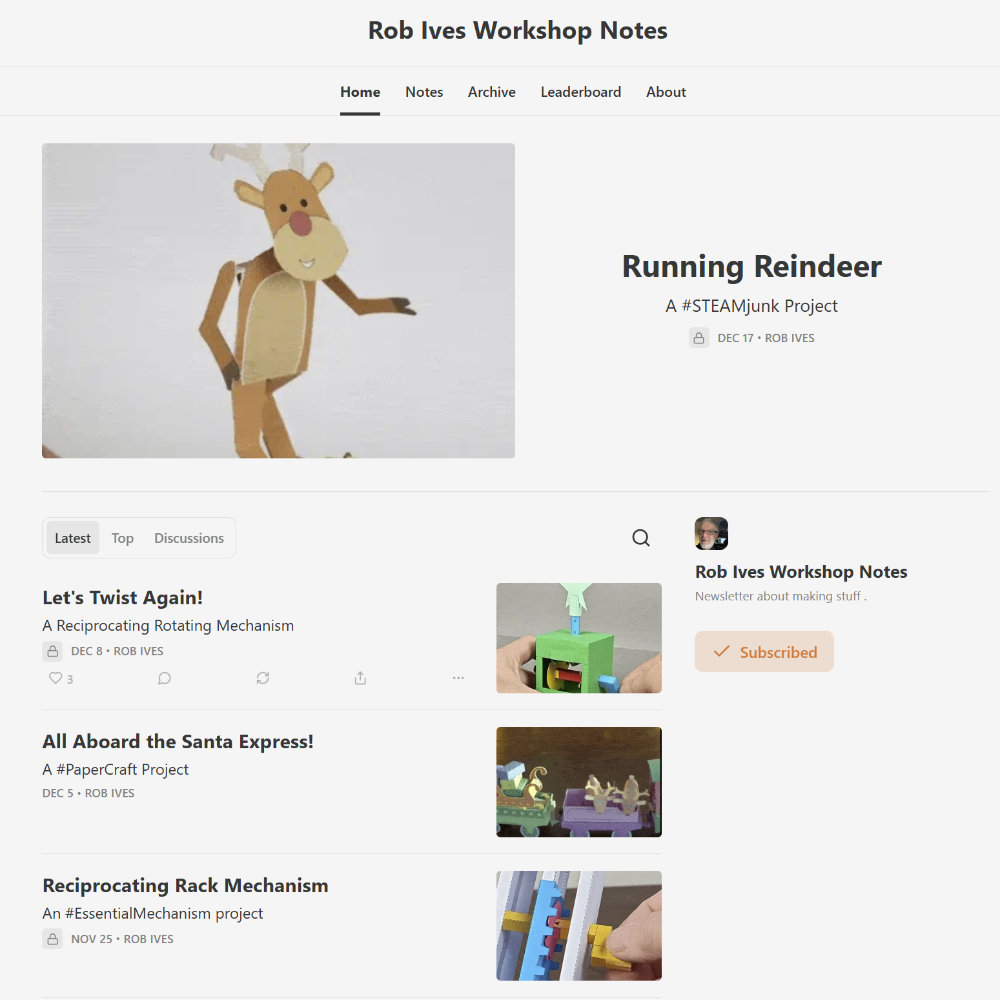
To that end, I've been experimenting with layouts using PhotoShop then asking #1 Daughter for her opinion (she's taking graphic design so she knows a thing or two about what works and what doesn't)
I'm pleased with the notebook look on the current front page but it takes up a l-o-t of space for only the two most recent entries.
So here is the latest stage of my updated version. There is only a single page and the clips are slightly shorter so I can fit the latest three posts rather than two. On the right of the page I have a pull-out of recent highlights from the blog so you can click and visit. I need to change the header and generally tidy up but I'm pleased so far and more to the point #1 Daughter approves. Any comments, crits or suggestions would be gratefully received.
Keep up to date: Receive the latest blog post by email
Add new commentHere's a quick download for you to try. This is a experimental mechanism (if that is the right word) which will be used in a more complete kit at a later date. It does work though and is rather fun!
The swanee whistle is a whistle with variable pitch. Pull the slider in and out and the pitch goes up and down. Download and print out the file from the end of this blog post, it is free for anyone to try.

It is a simple model but must be put together carefully and accurately. I printed out the parts sheet onto slightly heavier card than I usually use. 280 micron.
Score the dotted lines, cut out the air hole then cut out the parts carefully.
Fold the outer tube round and glue it together accurately. Fit the cover over the end of the tube so that the bottom edges of the cover line up with the bottom of the outer tube.

Assemble the inner tube. Set both parts to one side until the glue is completely dry.

Fit the inner tube into the outer tube. It should be a close fit but be free to move in and out.

Blow through the hole between the cover and the outer tube and the whistle should sound. Pull the inner tube in and out and the pitch will change!
You might also be interested in:
![]() Cuckoo |
![]() Train Whistle |
Keep up to date: Receive the latest blog post by email
The universal joint is a mechanism used to add a joint into a drive shaft, with the universal joint in place the drive shaft can be flexible.
Here is a quick to make model so you can see how the universal joint works. As a member you can download the parts at the end of this post, non members can download the model for a small fee.
Print out the three parts sheets onto thin card. Score all the and cut out the holes before cutting out the parts. Both these jobs are easier on whole sheets of card. Only cut out one hole in the support piece.

Glue the two dials into place on the fronts of the support pieces.

Once the glue is dry, cut out the hole fold round and glue the support together.

Glue together the two drive shafts...

...and glue on the end caps.

Glue the joiner plate onto one of the drive shafts

Add the other drive shaft to the other side with the tab at ninety degrees.

Thread the tabs from one base plate through the hole on the other base plate, don't glue it though, it needs to be free to move.
Using the grey areas for alignment glue the two supports onto the base.

Thread the drive shafts into the supports with the washers in place on the outside of the support. Note that the washers with the arrows are used on the dial side of the supports.

Assemble the handle in three stages as shown above.

Glue the handle to the end of drive shaft.

Once the glue is dry the model is complete!
Turn the handle and the driveshaft turns along its full length. Experiment by bending the base, see how the shaft still turns with a bend in it. There is a short-coming with the universal joint though.
Try this. Rotate the shaft at a constant speed at one end. While the shaft is straight the other end rotates at the same speed but add a bend and the shaft after the bend speeds up and slows down. Use the pointers and dials and you can see how angles change in a complete rotation. You'll notice that the greater the angle, the more noticeable the effect.
Car drive shafts use constant velocity joints rather than universal joints to overcome this problem. That'll have to wait until another model.
Keep up to date: Receive the latest blog post by email
Become a Member for free
access to this and other files on the site.See the Membership page for more details.
Already a Member? Log in Here
ijustgolf pointed out that the two axis joint model was very similar to a universal joint.
The universal joint is a mechanism used to take rotary motion round a corner. Based loosely on the two axis joint model I've put together this simple version.
I'll be making it up into a download in the next day or so.
Keep up to date: Receive the latest blog post by email
5 comments
I've done a fair bit of work on the new version of the Flying Pig web site over the past couple of days. The database is all there, I've added lots of products and the products now display nicely both as a grid view and on their individual pages.
Looking at it now, I think I need to go back and do the same with this website!
You can follow progress at the paperrobot.net website. The shop works, you can place orders if you wish.
Keep up to date: Receive the latest blog post by email
Add new comment
I designed this tortoise model earlier this year, it has been buried in the blog for a while now, the more articles get added to the blog, (nearly 300 now!) the fewer people see the earlier treasures so I thought I'd pull out a few models and add them to the show case where everyone can see them. It is a free download for member otherwise there is a small charge.
If you missed it first time round I hope that you enjoy it!
Keep up to date: Receive the latest blog post by email
Become a Member for free
access to this and other files on the site.See the Membership page for more details.
Already a Member? Log in Here
Here's a quick mechanism for you to download and try. If you are a member you can download it at the end of this post. It is a simple joint designed to move both back and forth and side to side. It could be used as the waist joint in a bendable character with friction locks to hold it in place once it is posed.

Print out two copies of the file below. I used two different colours of card. Glue the two sliders back to back, notice that they are rotated 90 degrees to each other.

Glue the two hinges inside of the sliders. Line up the end of the small part with the crease in the slider.

Make up the two bodies.

Glue the ends of the bodies to the hinges.

Place the slider covers over the sliders and glue them down. Make sure you don't get any glue on the slider. Otherwise it won't slide.

That's it, let the glue dry. The joint should now be free to move back and forth and side to side. Now to work out how this fits into a working model.
Keep up to date: Receive the latest blog post by email
Become a Member for free
access to this and other files on the site.See the Membership page for more details.
Already a Member? Log in Here
I'll be spending a couple of days completing the conversion of the Flying Pig web site to a new database driven site.
It has got to the point, with the current site, where adding new stuff is really hard. I have to add links to all the existing pages individually then check that all the pages are working correctly. It just gets more and more tangled! By running the web site from a database I can add pages and the links are all added automatically.
There is a fair bit of work getting the site started but once it is up and running, maintenance is much easier. You can follow progress at www.paperrobot.net Once it is all compete, I'll update the name tags and it'll be back to being www.flying-pig.co.uk.
The shop is fully working so if you want to order the printed kits please do!
Keep up to date: Receive the latest blog post by email
Add new comment
Just completed a new newsletter. If you are signed up, it should be with you soon.
If not - you can sign up at the link bottom left of the home page...
...or read it here. Newsletter
Keep up to date: Receive the latest blog post by email
Add new comment
Up until now if you wanted to pay for a download you needed to sign up with PayPal. But no more! I'm pleased to say that orders can now be placed with your normal credit card.
The prices are quoted in Pounds Sterling but the payment gateway takes care of currency conversions automatically. So, for example, the new Pneumatic Giraffe model, priced at £2.50 in the shop, would cost a US visitor around $3.90.
I hope you like the new system. Let me know if you have any questions or problem.